Importing from Google Sheets
Load a shared or published Google Sheet into an import by its link, with no sign-in, and choose which tab it reads.
Documentation pages
A designer’s balance sheet often lives in Google Sheets. Athena Asset Tables reads one by its link, the way a browser reads a page anyone can see. You sign in to nothing, and Athena Asset Tables keeps no Google credentials.
Share the sheet
Athena Asset Tables can read a sheet anyone with the link can view. In Google Sheets, either:
- click Share, set General access to Anyone with the link as a viewer, and copy the link, or
- choose File › Share › Publish to web, publish the sheet, and copy the link it gives you.
A sheet only your Google account can open cannot be read, and Athena Asset Tables says so rather than importing nothing.
Load it
On the import’s 1 Source step, paste the link into Google Sheets link and click Load Google Sheet.
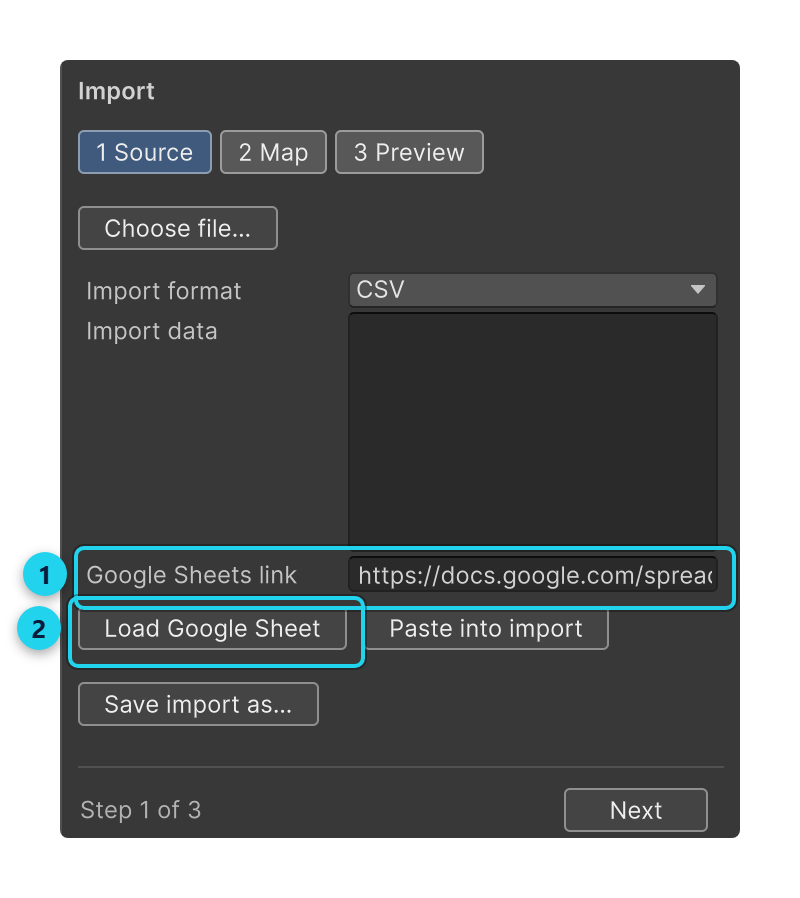
Athena Asset Tables downloads the sheet as CSV only when you click, and then the import goes on exactly as for a file: the first row is the header, Athena Asset Tables suggests a mapping, and nothing is written until you apply the preview. See Importing a spreadsheet.
Which tab
The tab you were on when you copied the link is the one Athena Asset Tables reads: a sheet’s link ends in gid=
followed by the tab’s number. A link with no gid reads the first tab. To import another tab, open that
tab in Google Sheets and copy the link again.
Next week’s sheet
When the same sheet changes every week, set the import up once and save it with Save import as…. Choosing it in Saved import downloads the sheet again, applies the saved mapping, and stops at the preview.
Links Athena Asset Tables accepts
Athena Asset Tables loads https://docs.google.com/spreadsheets/ links only, and nothing else: a sheet’s own link (ending
in /edit or /view), its export link, or a published link (ending in /pub or /pubhtml). Any other
address is refused before anything is downloaded.